 미국 공지 사항 | 업데이트
리포 징 갱신 - 새로운 리포지트 도구
(Reforging Renewed - New Reforging Tools)
New Reforging Tools
- Basic Reforging Tools, Precise Reforging Tools, and Exquisite Reforging Tools have been newly released.
- Exquisite Reforging Tools can be purchased from the Cash Shop.
- Basic Reforging Tools and Precise Reforging Tools can be obtained through in-game contents.
Basic Reforging Tool
- The Basic Reforging Tool can be purchased for 5,000 gold from some General Shops such as Walter in Dunbarton and some Partner Shops.
- This Reforging Tool can only be used on items that have not been reforged before.
- This Reforging Tool has no expiration and cannot be traded.
Precise Reforging Tool
- You can now obtain Precise Reforging Tools from the following in-game shops:
| Content | Cost | Weekly Purchase Limit (per account) |
|---|---|---|
| Melwyn's Royal Society Sponsorship Shop | Royal Society Sponsorship Badges x80 | 5 |
| Mag Mell Fionnait's Shop | Gold-Leaf Pine Cones x60 | 5 |
| Explorer's League Adventurer Seal Shop | Adventurer Seals x40 | 5 |
| Commerce Ducat Shop | 350,000 Ducats | 3 |
| Eavan's Dungeon Guide Voucher Shop | 20 Second, Third, or Fourth Vouchers | 4 (The purchase limit is shared across Voucher types) |
- This Reforging Tool has a 5-day expiration and is not tradable.
- The weekly Purchase Limit resets every Thursday at 7:00 AM PT.
Exquisite Reforging Tool
- The Exquisite Reforging Tool can purchased from the Cash Shop.
| Exquisite Reforging Tool (1) | Exquisite Reforging Tool (11) | Exquisite Reforging Tool (35) |
|---|---|---|
 |
|
|
|
Price: 1,500 NX |
Price: 15,000 NX |
Price: 45,000 NX |
- This Reforging Tool does not expire and can be traded once.
- The Exquisite Reforging Tool can increase the number of Attributes, and the Reforging Rank.
- When using this Reforging Tool, it is possible to obtain Attributes that are granted at a higher Minimum Level, depending on the Reforging Rank of the item.
- The Attributes will not be granted lower than the Minimum Level.
- When using this Reforging Tool, it is possible to obtain Attributes that are granted at a higher level than the Maximum Level, known as the Limit Break.
- The appearance and availability of a Limit Break depends on the Available Attributes for an item, and can be checked in the Reforging Menu.
- By using this Reforging Tool, one Hope Essence will be obtained.
- Hope Essence can be exchanged with Lassar in Tir Chonaill or Stewart in Dunbarton for additional items that can help you reforge items.
| Exchange Amount | Item | Function |
|---|---|---|
| Hope Essence x7 | Blossoming Hope Gem | - Increases the number of Attribute Slots to 3 of a selected item - Only items that have less than 3 Attributes can be selected - When the item is reforged next, it is guaranteed to receive 3 Attributes - Tradable once |
| Hope Essence x15 | Exquisite Reforging Tool (Not Tradable) | - Use this item to reforge a selected item. |
| Hope Essence x50 | Surging Hope Gem | - Increases the Rank of a selected item to Rank 1 - Only items that are below Rank 1 can be selected - Tradable once |
Reforging Tool Comparison
| Function | Exquisite Reforging Tool | Precise Reforging Tool | Basic Reforging Tool |
|---|---|---|---|
| Number of Attribute Slots Increased | Possible | Impossible | Possible |
| Rank Upgrade | Possible | Possible | Possible |
| Granting Attribute | Possible | Possible | Possible |
| Attribute Minimum Level | Yes | None | None |
| Limit Break Appearance | Possible | Impossible | Impossible |
Existing Reforging Tools Changes
- Existing Reforging Tools can still be used as before. However, they have been discontinued from the Cash Shop.
- Reforging Tool
- Fine Reforging Tool
- Credne's Reforging Tool
- Commerce Reforging Tool
- Refined Reforging Tool
- Refined Reforging Tool PLUS
- Premium Reforging Tool
- Amazing Reforging Tool
- Reforging Tool of Memory
- Obtaining Attributes and Reforge Rank ups while using Existing Reforging Tools is the same as before.
- New Reforging Tools and features such as the List of Available Attributes only applies to new Reforging Tools.
- The Reforging Tools that can be obtained in-game have been changed as follows:
| Content | Before Change | After Change |
|---|---|---|
| Festia Commemorative Gift Box | - Fine Reforging Tool | - None |
| Festia Treasure Hunt | - Fine Reforging Tool - Credne's Reforging Tool |
- None |
| Guardian Guild Tournament Trophy Box | - Fine Reforging Tool - Credne's Reforging Tool |
- None |
| Blaanid's Brave Boost Quest “Be Stronger: Winning Weapons for Warriors” | - Fine Reforging Tool | - Precise Reforging Tool |
| Dungeon Guide “Repeated Clear Guaranteed Reward” for certain dungeons | - Fine Reforging Tool - Credne's Reforging Tool |
- Precise Reforging Tool |
| General Shops, Partner Shops (Rem, Ram, Butler) | - Reforging Tool | - Basic Reforging Tool |
| Eavan’s Dungeon Guide Voucher Shop | - Fine Reforging Tool (Support) - Credne’s Reforging Tool (Support) |
- Precise Reforging Tool |
Reforging Menu
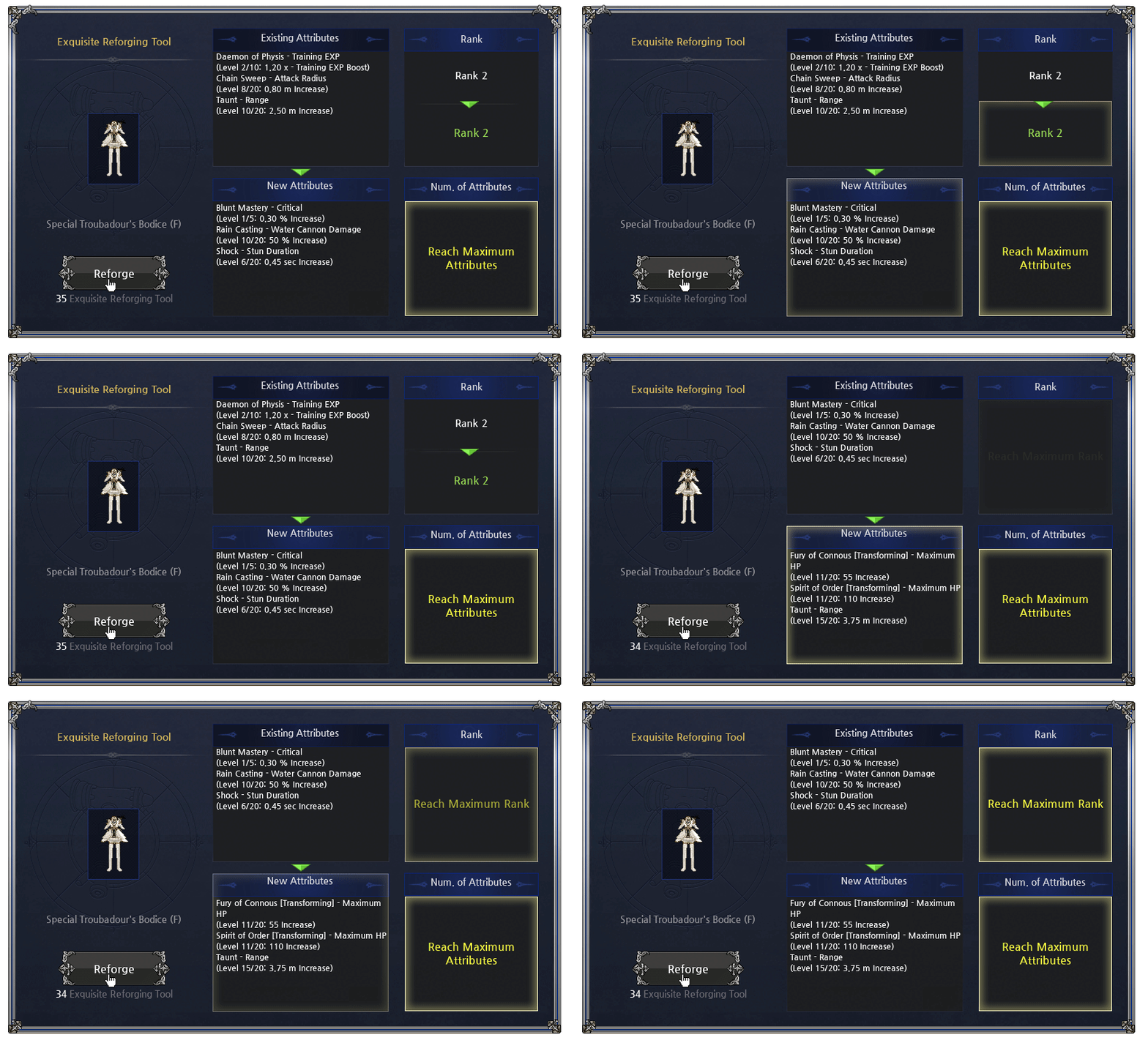
- The Reforging Tool menu and overall UI has been changed and usability has been improved.
- Improvements have been made so that you can see at a glance the number of Attributes, Reforging Rank, and Attribute changes before and after using a Reforging Tool.
- When a high-level Reforging attribute appears, it has been improved so that it can be easily checked within the Reforging Menu instead of the existing cutscene method that was inconvenient to use.
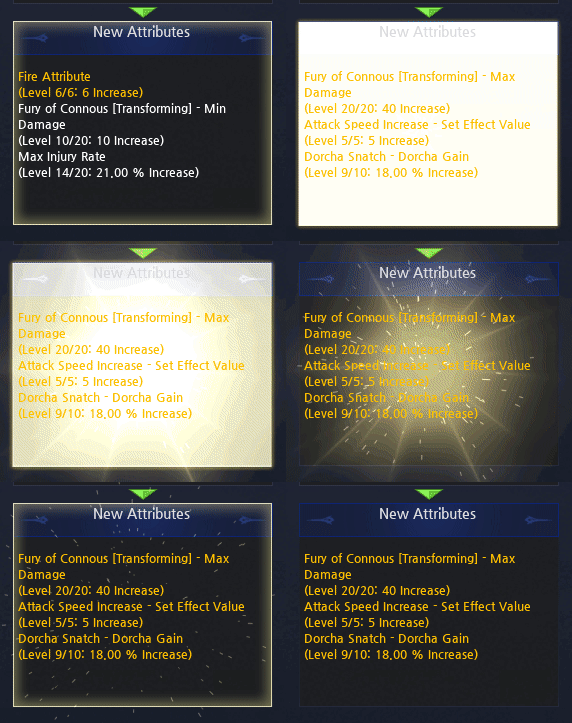
- You can conveniently check the Reforging Attributes that appear on the equipment you are trying to reforge from the List of Available Attributes menu.
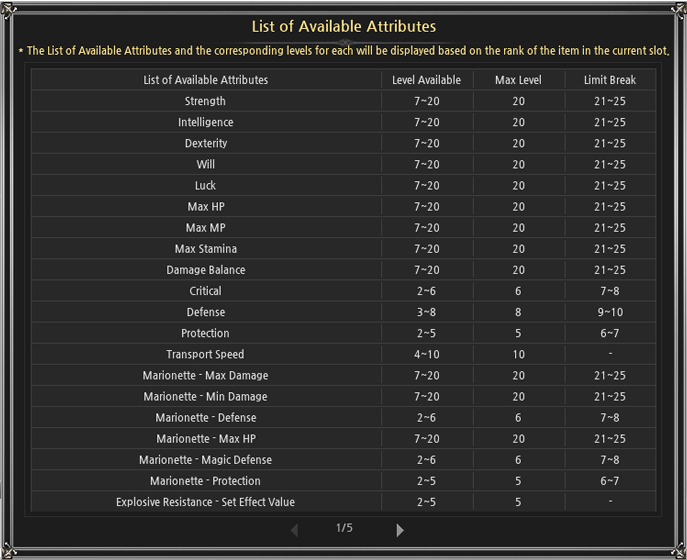
- To access the menu, click on the “Check List of Possible Attributes” button in the top right of the Reforging Menu.
- The populated list is relevant to the item currently placed in the Reforging Menu.
- The List of Available Attributes and Level Available columns are displayed based on the Reforging Tool being used and the current Rank of the item that is being reforged.
- The Level Available column is displayed as a level range.
- When using the Exquisite Reforging Tool, it is possible to obtain Attributes that are granted at a higher Minimum Level depending on the Reforging Rank of the item.
- The Attribute levels will not be granted lower than the Minimum Level.
- The Level Available column is displayed as a level range.
- The Maximum Level column is displayed based on Reforging Rank 1.
- When using the Exquisite Reforging Tool on items that are Reforging Rank 1, it is possible to obtain Attributes that are granted at a higher level than the Maximum Level, known as the Limit Break.
- The appearance and availability of a Limit Break depends on the Available Attributes for an item.
- The Limit Break column is displayed based on Reforging Rank 1.
- The minimum/maximum level of the Limit Break level is determined according to the maximum level based on Reforging Rank 1 of the Attribute.
- Example: Attribute with a maximum level of 20 based on Rank 1: Limit Break Level 21~25
- Example: Attribute with a maximum level of 10 based on Rank 1: Limit Break Level 11~13
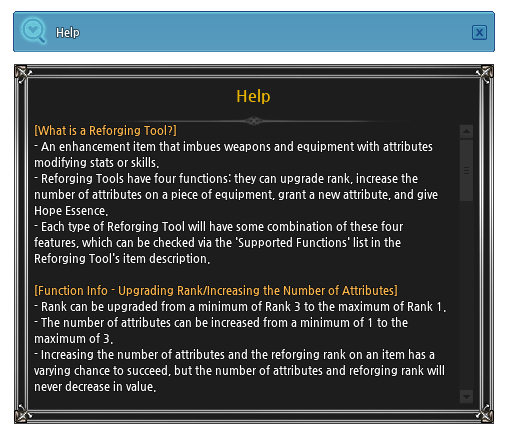
- Click the question mark icon the top-right corner of the Reforging menu to open the Help menu to read more about the Reforging Tool and its functions.
Additional Changes
- The way Reforging Attributes are displayed in the item tooltip has been changed to indicate the maximum level when displaying the Reforging Attribute. This change applies to all items reforged prior to the change in the display method.
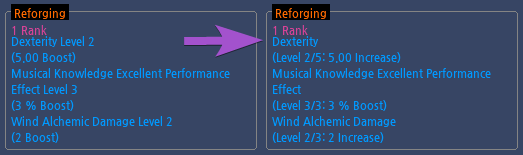
Before/After
- The contents displayed in parentheses are as follows:
- Attribute Name (current Attribute level/maximum level of the Attribute: Attribute effect increase).
- The maximum level displayed is based on the Exquisite Reforging Tool.
- The maximum level does not include the Limit Break level.
- Limit Break levels will appear as follows:

- Limit Break levels will appear as follows:
- In order to provide information on which Reforging Attributes can be obtained when reforging, the item type information that classifies equipment items has been added in the Item Attributes section of the item tooltip.
- The actual item name and item type classification of some items may be different.
- Example: Royal Diamond Leather Light Boots item is classified as Heavy Armor Shoes.
- The item type for enchantment, upgrades, Erg, and Spirit Contracts may differ from the item type for reforging.
- Example: The Practice Short Sword item is classified as a One-handed Sword when reforging, but One-handed Sword Erg enhancement and the One-handed Sword Spirit Contract cannot be performed.
- Example: The Gamyu Wizard Robe Armor (M)/(F) item is classified as Light Armor when reforging, but both enchantments for Clothing and enchantments for Light Armor can be applied.
- The 'Classic Spirit’ weapon type has been integrated into the general weapon type.
- ‘Classic Spirit’ weapons are classified as such when using existing Reforging Tools.
- Example: 'Classic Spirit One-Handed Sword' is displayed as 'One-Handed Sword' and reforges are applied as a 'One-Handed Sword' type when using a new Reforging Tool, but is still classified as 'Classic Spirit One-Handed Sword' when using existing Reforging Tools.
- Sun Road Colt, Mana Knuckles, Chef’s Passion, Royal Pumpkin Rapier, Romeo's Rapier, Lambent Light Rapier, Rose's Thorn Rapier, and Scythes can now be reforged using existing and new Reforging Tools.
- Item tooltip details have been added to the Item Attributes section for the items listed below. The available reforging Attributes will differ for items with these labels when compared to other items.
- Added the “Giant Full Swing Exclusive Weapon” label to Giant Full Swing-only weapons.
- Added “Unable to use Enthralling Performance” to instruments that cannot be used with this skill.
- Added “Commerce Enhancement Outfit” label to Commerce Outfits.
- Shield-Mastery related Attributes that only appeared on Reforging Rank 3 items have been removed.
- Unlike the previous system where a Reforging Tool purchased from the General Shop must be used on items that have not been reforged before, any item can be reforged using any new Reforging Tool.
- Attributes can be received at an equal probability.
- The minimum level of all Attributes has been adjusted to level 1.
- The maximum level of Attributes is unified based on the highest level at which the Attribute can appear and can be reviewed in the Reforging Menu.
- Attributes that can only be used by a specific race appear only on equipment that that race can wear.
- Example: The Final Hit Cooldown Reduction Attribute, which can only be used by Human races, is organized into 'Heavy Armor' and 'Hat' item types, and can be worn by Humans in equipment items categorized for all races, Human only, Human/Elf only, and Human/Giant-only.
- Example: The Magnum Shot Damage Attribute, which can only be used by Human and Elf races, is organized into 'Heavy Gauntlets', 'Gloves', and 'Accessory' item types, and can be worn by Humans or Elves in equipment items categorized for all races, Human only, Elf-only, and Human/Elf-only.
- The following Attributes can now appear for all items.
- Strength
- Intelligence
- Dexterity
- Will
- Luck
- Max HP
- Max MP
- Max Stamina
- Damage Balance
- The following Attributes have been adjusted to appear in the following items:
| Item Type | Attributes |
|---|---|
| Heavy Armor | Control Of Darkness - Duration |
| Light Armor | Control Of Darkness - Duration |
| Clothing | Explosive Resistance - Set Effect Value Poison Immunity - Set Effect Value Stomp Resistance - Set Effect Value Control Of Darkness - Duration |
| Shoes | Charge - Training EXP Stomp - Training EXP Water Cannon - Training EXP Wind Blast - Training EXP Flame Burst - Training EXP |
| One-Handed Sword | Spear of Light - Damage |
| Two-Handed Sword | Fury of Connous [Transforming] - Maximum/Minimum Damage |
| Hatchet | Spear of Light - Damage |
| Two-handed Axe (Giant Full Swing - Only) | Final Hit - Maximum/Minimum Damage Sword of Order [Transforming] - Damage Sword of Order [Transforming] - Injury Rate Body of Chaos [Transforming] - Strength Fury of Connous [Transforming] - Maximum/Minimum Damage Spear of Light - Damage Fury of Light - Damage Shadow Spirit - Damage Wings of Rage - Damage |
| One-handed Blunt Weapon | Spear of Light - Damage |
| Two-Handed Blunt Weapon (Not Giant Full Swing - Only) | Fury of Connous [Transforming] - Maximum/Minimum Damage Spear of Light - Damage |
| Two-Handed Blunt Weapon (Giant Full Swing - Only) | Fury of Connous [Transforming] - Maximum/Minimum Damage Spear of Light - Damage |
| Tribolt Wand | Thunder - Maximum/Minimum Damage Fireball - Maximum/Minimum Damage Ice Spear - Maximum/Minimum Damage Spear of Light - Damage |
| Lightning Wand | Fireball Maximum/Minimum Damage Ice Spear - Maximum/Minimum Damage Spear of Light - Damage |
| Ice Wand | Thunder - Maximum/Minimum Damage Fireball Maximum/Minimum Damage Spear of Light - Damage |
| Fire Wand | Thunder - Maximum/Minimum Damage Ice Spear - Maximum/Minimum Damage Spear of Light - Damage |
| Healing Wand | Firebolt - Maximum/Minimum Damage Spear of Light - Damage |
| Staff | Blaze - Explosion Damage Spear of Light - Damage |
| Combat Wand | Magic Attack, Elven Magic Missile - Magic Damage Spear of Light - Damage |
| Cylinder and Tower Cylinder | Strength Intelligence Magic Attack Sword of Order [Transforming] - Damage Sword of Order [Transforming] - Injury Rate Body of Chaos [Transforming] - Strength Fury of Connous [Transforming] - Maximum/Minimum Damage Daemon of Physis [Transforming] - Maximum/Minimum Damage Spear of Light - Damage Fury of Light - Damage Shadow Spirit |
| Knuckle | Spear of Light - Damage Fury of Light - Damage Wings of Rage - Damage |
| Control Bar and Spell Book | Sword of Order [Transforming] - Damage Sword of Order [Transforming] - Injury Rate Body of Chaos [Transforming] - Strength Fury of Connous [Transforming] - Maximum/Minimum Damage Daemon of Physis [Transforming] - Maximum/Minimum Damage Spear of Light - Damage Fury of Light - Damage Shadow Spirit - Damage Wings of Rage - Damage |
| Dual Gun, Shuriken, and Chain Blade | Lightning Attribute Fire Attribute Ice Attribute Spear of Light - Damage |
| Bow and Crossbow | Body of Chaos [Transforming] - Strength Spear of Light - Damage |
| Atlatl | Spear of Light - Damage Fury of Light - Damage Shadow Spirit - Damage Wings of Rage - Damage |
| Lance | Spear of Light - Damage |
| Blacksmith Hammer | Magic Attack |
| Fishing Rod | Strength Intelligence Max HP Damage Balance Magic Attack Attack Speed Increase - Set Effect Value |
| Cooking Tools | Damage Balance Magic Attack Attack Speed Increase - Set Effect Value |
| Handicraft Kit | Damage Balance Magic Attack Attack Speed Increase - Set Effect Value |
| Carpentry Tool and Lumber Axe | Intelligence Max MP Damage Balance Magic Attack Attack Speed Increase - Set Effect Value |
| Tailoring Kit | Magic Attack Attack Speed Increase - Set Effect Value |
| L-Rod | Max HP Magic Attack |
| Instrument (Enthralling Performance enabled) and Instrument (Unable to use Enthralling Performance) | Attack Speed Increase - Set Effect Value |
Important Notes
- There are some text discrepancies between Reforging Attributes (including Echostone Awakening) obtained before the update and Reforging Attributes obtained after the update.
- This will be changed in a future patch to unify the Attribute text. Note that the Attribute boosts function the same, regardless of how it was obtained.
- Example: Stomp Defense -> Stomp - Resistance - Set Effect Value
- Example: Dual Gun Max Damage -> Dual Gun - Max Damage
- This will be changed in a future patch to unify the Attribute text. Note that the Attribute boosts function the same, regardless of how it was obtained.
- There are some text discrepancies for certain Reforging Attributes that incorrectly express the Attribute's boost and will be changed in a future patch.
- "Amplify" will be removed from certain Attributes.
- Example: [Transforming] Max HP Amplify -> [Transforming] Max HP
- "Increase" will be removed from certain Attributes.
- Example: Max Damage Increase -> Max Damage
- Certain Attributes listed boosts without percentages and will be changed to include "%".
- Example: Support Shot - Damage (Increased by 2 per level) -> Support Shot - Damage (Increased by 2% per level)
- "m increase" will be changed to "cm Increase".
- "Sakura Abyss - Attack Range Per Second Charged (Increased by 1cm per level)" will be changed to 2cm per level.
- "Charge available for Human and Elf without shield" will be changed to "Charge - Usable Without Shield (Human/Elf)".
- "Amplify" will be removed from certain Attributes.